Episode 2 - Blog
WoS S1E2. Talking to the movement of NPCs and the missing day/night cycle the game could offer us as a way of creeating two games in one.
Introduction
Azeroth is a stunning world. Not just visually, but also in its size and diverse range of biomes. I loved exploring it as a new player in 2006, and today I can explore it all to my self on my own laptop! However, the state of Azeroth during the era of the WOTLK can be summed up quite simply as: static.
The Static World
When I first played WoW back in 2006, it was the world itself that I loved the most. Specifically, it was the sheer size of it that I was drawn to - there are so many biomes to explore, NPCs to talk to, side quests, and things to see. This was mostly what I did when I played the game way back when: I just travelled around, hardly doing any of the dungeons or raids, and mostly playing alone. I liked it that way.
As I moved around the world - the towns, the cities, and the landscapes - I began to notice the world was kind of static. Obviously buildings and such don't move, but neither did the NPCs. They never even so much as walked an inch or even ventured into the building they're so often standing directly next to... why?
I also began to notice that the day/night cycle of Azeroth was basically just a visual effect. Nothing reacted to the cycle, not even the NPCs, who seem to be able to stand on the same spot 24 hours a day, come rain or sunshine. They don't even eat or sleep... again, why?
All of this got me thinking: can I make the NPCs move around from time to time, and can I make the day/night cycle relevant and even a cool game play mechanic?
I'm going to explore the movement of NPCs. I'll look at the day/night cycle next time because I want to dedicate a decent amount of development time to it and give my audience (that's you!) a decent bit of content with a balanced amount of detail.
Today however, let's take a look at what's involved with moving NPCs around.
NPC Movement
To get the ball rolling, or should I say the NPC moving, I decided I would focus on moving a few pre-existing NPCs and also create my own. First, I started with a Stormwind Guard and designed a path for her. Second, a random Stormwind citizen was next: again all I did was design a path for her to follow. Finally, I invented a new NPCs in Goldshire and set her up on a long-winded journey to Northshire and back.
But how does one actually get NPCs moving in Azeroth? As I'm using AzerothCore, I started by exploring its feature set, specifically the game master commands involved and the database tables that store all the information.
Behind the scenes, AzerothCore uses the concept of waypoints and paths. A waypoint is simply a location in Azeroth in the form of a 3D vector: X, Y, Z, and orientation. A path is, as you might have guessed, a collection of waypoints that form a path to be followed by an NPC. Easy enough so far.
However there's a part of the whole process that's actually quite difficult and really shows you how hard game design is, and that's designing routes for NPCs that make logical sense, feel natural, and also fit in with the environment around them.
Designing Paths
We'll explore the technical nature of waypoints and paths shortly. For now let's consider the difficulty of actually planning an NPC's route.
We can start by looking at the humble Stormwind Guard:
Some of them do have patrols already, but a lot of them are also static. I think static guards make sense for an hour or two, but even the King's Guards at Buckingham Palace move from time to time, so I think the Stormwind Guards should move too. But where to, for how long, and why?
The "Where?" part of the design is harder than you might think. For a guard looking after a small area it's not too difficult: you just have them patrol that immediate area. That's what I did with one Stormwind Guard. They patrol a small area, going down a few back alleys and eventually returning to their original spot.
The question of "How long should the guard pause for?" is a little harder to answer, but I went with whatever I figured was organic. The pauses are actually important too, because if the guard comes to a stop to watch over an area but then moves on 20 seconds later, then they return to their original post too soon. Instead, I opted for some of the pauses to be 20-30 minutes.
I wanted the guard's action and reasoning for moving around to feel organic too. For example, I have the guard wave into a shop, as if interacting with someone in there, to make them feel move alive.
Overall the process of moving an NPC around in a way that seems natural is actually quite hard. Take another example: the quest giver. How do you move around a quest giver in a way that allows people to not only find and accept the quest, but morely importanly hand it in? I think the answer is to only move them around a short distance, and use emotes and dialogue to make them seem more alive.
And what about flight masters? They're static for a reason, but surely we can agree they need to move around too? Personally I think the solution to this is to give more power to the player with regards to moving around, but still the flight masters must also move. Perhaps to the local inn to take a break?
But why even bother with all of this? Is the player really going to notice all of this movement? Oh yes. Players like me often ask, "What happens if I follow this NPC around? Where will they go? What will they do?" For example, have you ever completed a quest in Oblivion only to then follow the NPC who runs off to see where they go? Todd Howard of Oblivion fame was aiming to solve this problem of immersion when he created the Radiant AI, which this comment on Reddit sums up nicely:
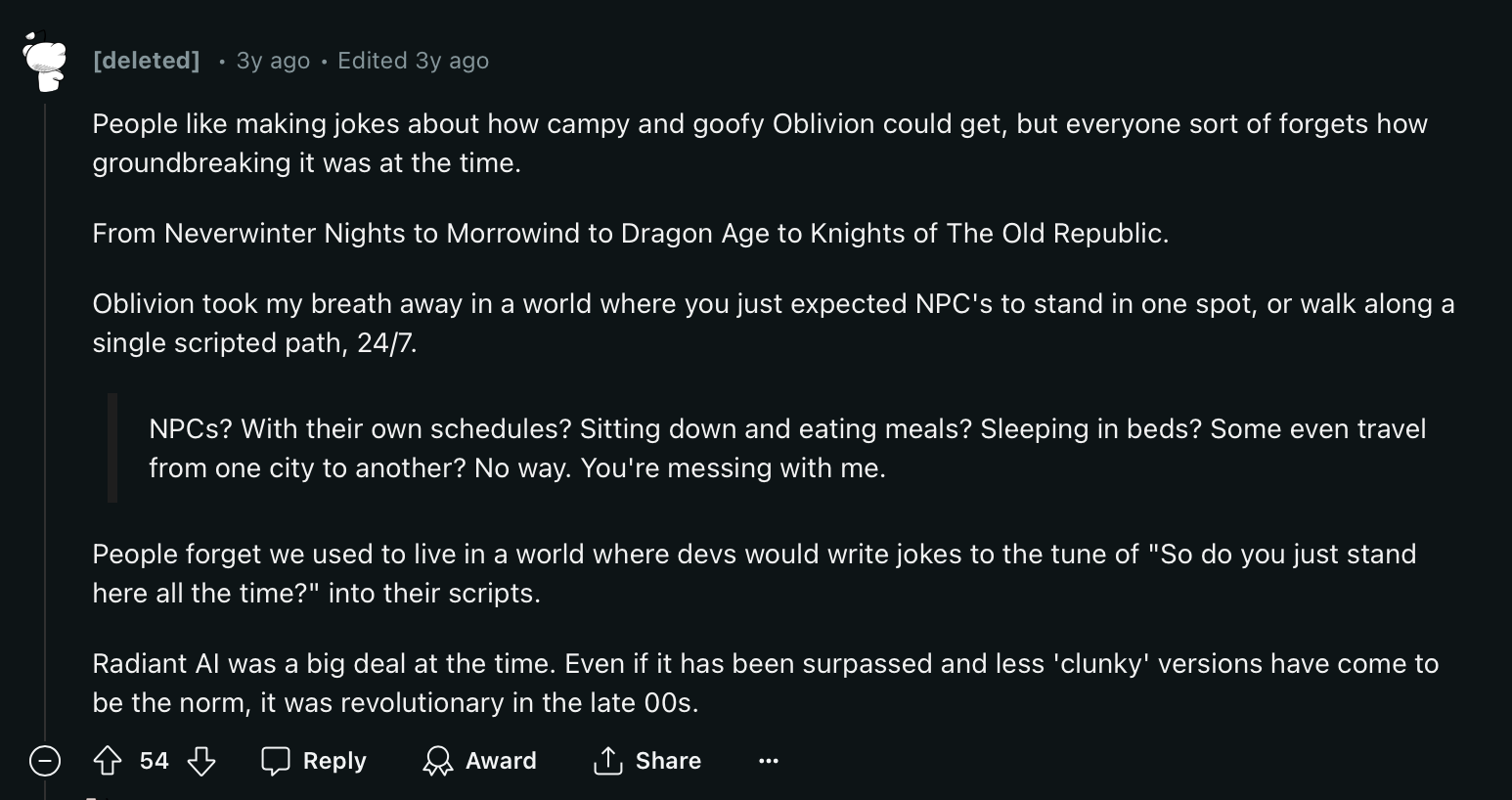
I'm obviously not implementing an entire Radiant AI here, I'm just making NPCs less static so they appear more alive. I think once something like has been applied to most NPCs in Stormwind it would become something people notice over time.
To get things started, we have to look at the Game Master (GM) commands we'll be using in-game.
GM Commands
The waypoints themselves can be placed by using an in-game game master command whilst standing in the right location (your X, Y, and Z) and facing the right direction (your orientation.) These commands update the database and a few tables behind the scenes.
There's a table for containing the waypoints - waypoint_data (not waypoints) - but there isn't one for the path information as it's embedded directly into the same table as the waypoint itself. This means you repeatedly use the same waypoint ID as you place them, but a unique path ID is automatically incremented one-by-one, forming the "path". For attaching the waypoint or the path to the NPC, there's also only a few simple tables to be concerned with and once updated, the NPC will begin following the waypoints and acting accordingly.
Note
All GM commands that are used in-game are basically just typed into the chat window. Yes, the same window you use to troll other players with and be a douche.
The command for adding a new waypoint is:
.wp add <id>
The <id> is the waypoint ID, and this stays the same for the path you're creating. You don't manage the path ID yourself. Instead it simply starts at 1 and automatically increments from there. Each waypoint <id> starts with a point (as the table column is called; it's not called "path ID") and this is incremented for you.
So if you set the <id> to 1234, then you'll end up with a row in the waypoint_data table that looks like this:
Note
I've omitted most columns for readability.
| id | point | position_x | position_y | position_z | ... |
|---|---|---|---|---|---|
1234 |
1 |
4567.1234 |
56.78 |
4.56 |
... |
You repeat this .wp add command over and over, adding waypoints under the same waypoint ID, therefore producing a path (as the point ID increments), until you have the path you want the NPC or NPCs to follow.
Here's an updated, and still truncated, version of the waypoint_data table:
| id | point | position_x | position_y | position_z | ... |
|---|---|---|---|---|---|
1234 |
1 |
4567.1234 |
56.78 |
4.56 |
... |
1234 |
2 |
4567.1234 |
56.78 |
4.56 |
... |
1234 |
3 |
4567.1234 |
56.78 |
4.56 |
... |
Note how the point column has been incremented because we used .wp add 1234 three times (hence why point is equal to 3.)
You finalise the whole task by using another series of game master commands to reload and load the waypoints, applying them to the NPC, which results in them moving along the path you've designed:
.wp reload <id>
.wp load <id>
With the .wp load command, you must have a creature selected in-game to apply the waypoint ID to. Also, the creature you have selected cannot already have waypoint data defined. If all is well and good, your NPC will literally start making their way to the first waypoint, then the second, the third, and so on. Completely automatically without restarting the core or the client. Magic!
Make it a round-trip!
You just have to make sure you design a circular path otherwise they won't end up where they originally started. NPCs don't walk back along a waypoint. You have to add more waypoints going either backwards towards the starting point or design a circular path.
The NPC moving along the path isn't the only result you get from those game master commands, however. As we know, the database is also updated live to make the changes persistent, and that's where we encounter our first technical difficulty: how do we share those updates with others?
I'm going to discuss this next, but everything I've said above can be summarised like so: use the in-game GM commands to set waypoints (use a macro!) and keep notes of each one, but then extract the changes made to the database by those commands so that you can "codify" the changes for future use.
Hello Daisy
Just a short diversion here.
Daisy is a custom set of tools I wrote for interacting with the AzerothCore database via YAML. It's early days right now, but it already allows me to write a small amount of YAML in return for thousands of lines of readable, maintainable SQL.
This means instead of writing a lot of complex, repetitive SQL, which is error prone and annoying, you can instead write far, far less YAML and get highly readable, maintainable (but admittedly verbose) SQL. This is handy on a lot of levels, but that's not the focus of this piece, so I'll just leave that there for now.
There are two tools in the Daisy suite that we're interested in today:
daisy.pyfor converting YAML (Packs) to SQLdb2yaml.pyfor converting live database table entries into YAML, which can then be converted back to SQL via a Daisy Pack
The SQL
OK back to the core of this discussion.
I will admit that I do like to make things a bit more difficult for my self because I want everything and anything I produce to be reproducable by others. This means that however I solve the problem of making NPCs follow paths so they appear more natural, I want it to be done in a way that lets others use the results for their own entertainment. This raises the bar a bit, and that's why I wrote the db2yaml.py tool.
Given the waypoint commands update the database behind the scenes, how do we then make that reproducible for others? SQL. We need to extract those changes as SQL so that others can then inject that SQL into their own AzerothCore database, allowing them to replicate the work I've done. This is a sort of "AzerothCore-as-Code" like solution for the database.
As a side note, if you knew all of the X/Y/Z/orientation coordinates of every waypoint ahead of time, you could write the SQL first, but that's really time consuming. Instead what I do is leverage the ID of the waypoints in the database and use a custom made Python tool to extract the rows from the table (that's db2yaml.py). This allows me to use a template to produce the SQL, which in turn allows others to then use that SQL to replicate everything I've done.
For example, if you used the .wp add 1234 command twice and then used the db2yaml.py tool, you'd get the following YAML:
Well almost
Some extra work is needed after the db2yaml.py tool has finished its task, but the final result is close to what you get directly from running the tool. I'm pulling an example here so it has a bit extra in there.
waypoint_data:
  - id: 1234
    point: 1
    position_x: -9467.28
    position_y: 54.4442
    position_z: 56.8735
    orientation: 0.0
    delay: 160000 # 3m-ish
    move_type: 0
    action: 0
    action_chance: 100
    wpguid: 0

  - id: 1234
    point: 2
    position_x: -9454.5
    position_y: 58.102
    position_z: 56.0585
    orientation: 0.0
    delay: 0
    move_type: 0
    action: 0
    action_chance: 100
    wpguid: 0
Now you can embed this YAML into a Daisy Pack and then use daisy.py to produce a tonne of high quality SQL you can import into AzerothCore, across any number of instances, over and over. The SQL looks like this - again, it's very verbose and this is just one entry:
-- START waypoint_data
SET
@id := 1234,
@point := 1,
@position_x := -9467.28,
@position_y := 54.4442,
@position_z := 56.8735,
@orientation := 0.0,
@delay := 160000,
@move_type := 0,
@action := 0,
@action_chance := 100,
@wpguid := 0;

DELETE FROM waypoint_data WHERE
  id=@id AND
  point=@point
;

INSERT INTO waypoint_data (
  `id`,
  `point`,
  `position_x`,
  `position_y`,
  `position_z`,
  `orientation`,
  `delay`,
  `move_type`,
  `action`,
  `action_chance`,
  `wpguid`
)
VALUES (
  @id,
  @point,
  @position_x,
  @position_y,
  @position_z,
  @orientation,
  @delay,
  @move_type,
  @action,
  @action_chance,
  @wpguid
);
-- EOF waypoint_data
It's verbose, but highly readable, portable, maintainable, and can be used as documentation for the table itself and your work.
By the way, we'll talk about the action and delay columns below. They're quite interesting.
NPC Updates
Now those waypoints on their own don't actually do anything. They're literally just 3D vectors with some additional meta data attached. You need to update the NPC(s) and tell them to walk or run to the first waypoint. That's when they'll continue along the path you've designed. Luckily this is just a few database updates and those can be done with Daisy using an update statement.
You need to update the creature and creature_addon tables. It's best to update these tables even if the values are already set to what you expect, that way you create a complete, idempotent solution.
First you need to update the creature table, which contains the live instance of the creature in the world (which takes its template from creature_template):
Note
This is a Daisy update statement. It was taken from this example.
update:
  # Stormwind Guard 01
  - table: creature
    columns:
      currentwaypoint: *SW_GUARD_01_GUID_WP
      movementtype: 2 # waypoint
    where:
      guid:
        - *SW_GUARD_01_GUID
This can be translated to SQL as:
UPDATE creature SET currentwaypoint=X and movementtype=2 WHERE guid=Y;
Where X and Y are valid values for a valid row. The advantage of the YAML is readability and YAML Anchors.
In the YAML, however, I'm doing the same thing by updating the currentwaypoint and movementtype columns. I set the currentwaypoint to the value of the first waypoint in the path (with a position of 1.) I change the movementtype to 2 which means "path". Without this latter change, the NPC will not move at all. By the way, 1 is "random", which is nice for having the NPC just move about in a small area, which you can also define.
Just to repeat, the *SW_GUARD_01_GUID_WP is a YAML Anchor, the value for which can be seen here.
Finally I update the creature_addon table like so:
update:
  - table: creature_addon
    columns:
      path_id: *SW_GUARD_01_GUID_WP
      where:
        guid:
          - *SW_GUARD_01_GUID
I'm setting the path_id to the same value at the YAML Anchor. I'm updating this field based on the guid column being equal to the value at the SW_GUARD_01_GUID Anchor (120692 in this case.)
Waypoint Actions
But wait, there's more!
An NPC can be instructed to do things once they reach a waypoint, like pause, play an emote, a sound, or even trigger another script - something I've yet to master - and they can even be configured to do all of these things if you desire. You can also get an NPC to say or yell something.
With the built-in game master commands you can - so the documentation will tell you - change a waypoint's configuration such as the delay and the emote, etc. but I've found this sometimes crashes the engine and the client. I'm told the waypoint commands are an old remnant of the MaNGoS engine days, so I've decided to ignore them.
Instead what I do is keep notes as I move through the world placing waypoints. Notes such as: how long will the NPC wait here at this specific waypoint? Will they play an emote like waving or yawning? What direction will they face? Little details along those lines. Usually most paths I create don't extend beyond 30-50 waypoints, so it's not a hardship to keep a few notes about 4-5 of them.
So, to trigger an action we need to use the action column in the waypoint_data table. This column is referrencing the id column of the waypoint_scripts table. The action_chance column is literally the chance the operation will complete from 0% to 100%. This can be handy for making some emote or say actions "rare", adding an extra organic feel to things.
To create a waypoint script we need a few things. We need the "command" for the command column, and the datalong, datalong2, and dataint to "configure" the command. The commands are well documented - it's basically an integar that defines what the command/action is - and the data* columns are also documented well enough (although work is needed here.) You'll need to review the "OtherFields" part of the documentation, which describes what the data* fields are based on the command you choose.
Now just a note about the id and guid fields. I found these to be a bit confusing and annoying. Essentially the id column is used in other tables to refer to this script. You use this value in the waypoint_data.action column to clearly define what script you want to run for that particular waypoint. The guid column is the primary key the script and must be unique.
But here's the reasoning behind this, which is quite clever: you can create multiple scripts with the same id, but different, unique guids. Why, you ask? Because you can create a multi-step script!
If you did the following via Daisy (the code is here):
tables:
  waypoint_scripts:
    - id: *NPC_RENATO_GALLINA_GUID_WP_ACTION_01
      command: *SCRIPT_COMMAND_EMOTE
      datalong: *NPC_EMOTE_ONESHOT_TALK
      # (but it always needs a unique GUID)
      guid: *NPC_RENATO_GALLINA_GUID_WP_ACTION_01

    - id: *NPC_RENATO_GALLINA_GUID_WP_ACTION_01
      command: *SCRIPT_COMMAND_TALK
      datalong: 0
      dataint: *NPC_RENATO_GALLINA_GUID_WP_ACTION_01
      guid: *NPC_RENATO_GALLINA_GUID_WP_ACTION_02
Then you're defining a multi-step script because both of the id columns are being set to *NPC_RENATO_GALLINA_GUID_WP_ACTION_01, which is just a YAML Anchor for another value: 7968801. The guid however is being set to two unique values, which is required to keep the rows in the table unique and indexed.
The Eagle Eyed among you will have noticed this:
dataint: *NPC_RENATO_GALLINA_GUID_WP_ACTION_01
This is configuring this script's "talk" action with the text to say, but it's not enough to simply provide a string of words you want the NPC to say. To make this work, you must also update the broadcast_text table and have it contain the text you want the NPC to say (or yell) out loud. Here's the Daisy code:
tables:
  broadcast_text:
    - id: *NPC_RENATO_GALLINA_GUID_WP_ACTION_01
      maletext: "I may have had a bit too much wine at breakfast"
      femaletext: "I may have had a bit too much wine at breakfast"
      flags: 1
I set the flags to 1 as it's what the existing texts use, so I just run with it. I also set both the maletext and the femaletext columns to what I want the NPC to say as I have no idea how the engine delineates between male and female NPCs. The id columns must be unique and is what you're referring to in the dataint field for a "talk" script.
Cut Scenes, anyone?
To create an in-game, real-time rendered cut scene, you'd use waypoints and scripts, along with the delay column(s) to have NPCs use emotes, say things, move a bit, say something else, etc., giving the impression of a cut scene. Cool, hey?
Summary
So making an NPC move around in an organic manner, with a few personality traits like saying things to other NPCs, whilst pausing and eventually making their way back to where they started is... easy? Depending on what you want to do, you have to design a well thought out route for the NPC and then use delays, actions, and more, to ensure they appear natural and effortlessly fit into their environment.
But overall it's not really easy. There's a lot to consider when moving just a single NPC, and I don't mean the design of it. There's all the tables that need to be updated too. I've not actually explored all of the features yet. I really want to play around with having an NPC's waypoint script trigger another NPC to do something or even just cast a spell!
That's the thing I love about this engine: it gives you everything you need to create so much, but in a weird and frustrating way it doesn't give you all the documentation you need, forcing you to explore and learn. I guess I get a kick out of that?
Next steps
I'm going to start working on moving most of the NPCs in Stormwind as well as adding more NPCs to make the city feel more alive. I'll then do the same for Elwynn Forest and some surrounding human areas. Once complete, I'm going to implement a day/night cycle to the same areas, which I believe will be a literal game changer.
Until next time.